Opening Lab: Find the Exact Branch Where Your Results Drop
"You score 41% in the Italian Game" is a true sentence that you cannot do anything with. The Italian is a tree with hundreds of branches, your results are almost never uniform across it, and the average hides the one branch that is actually costing you points.
Opening Lab, which landed as part of ChessLogix 2.0.1, exists to answer the next question instead: where exactly does it go wrong, and what should I play there?
Step One: Your Own Record, With Labels
Before recommending anything, Opening Lab reports what your own games say. Every figure on the page is labeled for what it counts — "Your score: 26%", "Played in 19 games", "Reached in 62% of your games" — because a bare percentage whose denominator you have to guess is worse than no number.
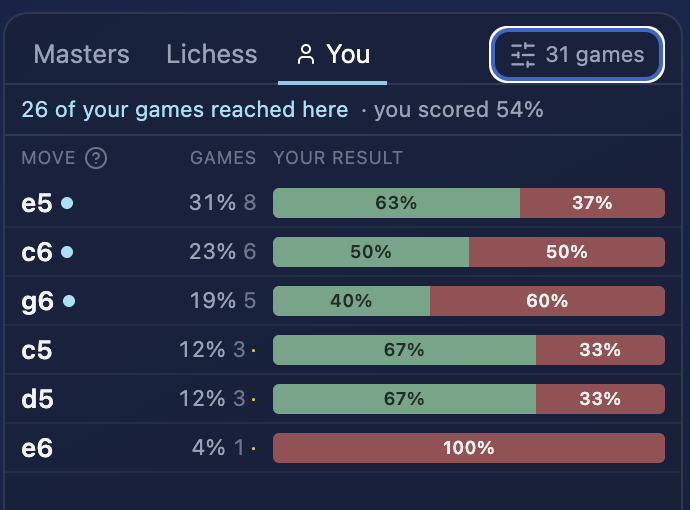
Score counts a win as one point and a draw as a half, and every percentage carries the number of games behind it — so three games read as three games rather than as a confident-looking 67%.
Four separations do most of the work here:
- White and Black are never merged. Repertoire problems are color-specific. A line you're comfortable meeting is not a line you're comfortable playing.
- One account at a time. If you play under several Chess.com or Lichess handles, filter to one. A serious rapid account and a casual blitz account produce different — and contradictory — repertoire evidence.
- Time controls are selected independently. Bullet, blitz, rapid, classical and correspondence, because a line that's fine at 15+10 may be unplayable at 3+0.
- Position, not move order. Reach the same position by a different move order and Opening Lab knows it's the same position. Your record and your preparation follow the position, so backing up to try another move order never discards the work.
Then you follow the tree down, reply by reply, until you find the move where your score separates from what the position is actually worth.
Step Two: Two Answers About the Same Position, Kept Apart
This is the design decision the whole tool rests on, and it's the one most opening tools get wrong by averaging it away.
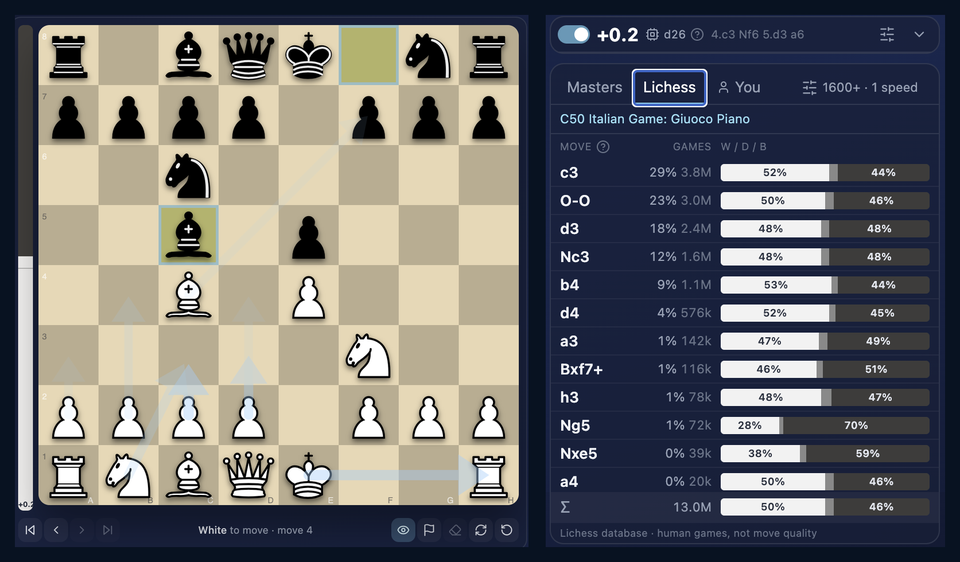
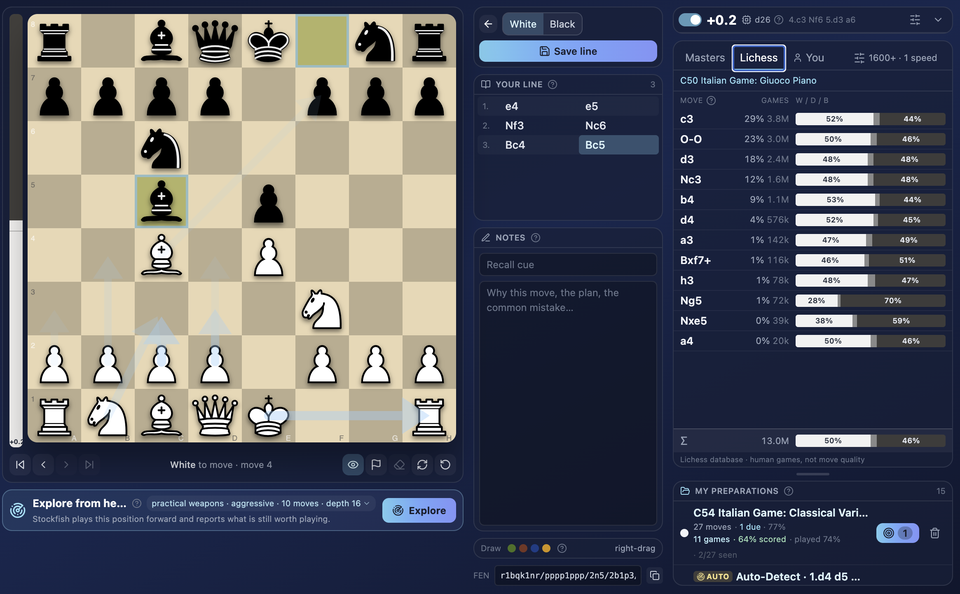
On the left, the engine: this position is worth +0.2 at depth 26. That is soundness — what survives best play.
On the right, human results: c3 is played in 29% of 3.8 million games and scores 52%. That is practical difficulty — what happens when people play it with a clock running.
They are shown side by side and never combined into one score, because the disagreements are the informative part. A line that scores well and evaluates as equal is a practical weapon. A line that scores well and evaluates as losing is a trap that works right up until it doesn't. Averaging those two into a single "goodness" number destroys exactly the information you needed.
Three sources sit behind those numbers, and which one you're reading is always on screen: your own imported games, the Lichess database filtered to the rating range and speeds you pick, and Masters games. Masters is there as a second opinion on soundness, not as a guide to what you should play — if a line vanishes at master level while scoring well in your band, that usually means it works because the refutation is hard to find. Worth knowing before you build a repertoire on it.
Step Three: Explore, With the Question Stated Up Front
Once you've found the branch, exploration searches for candidate replies. It starts from an explicit question rather than a generic "best move" request.
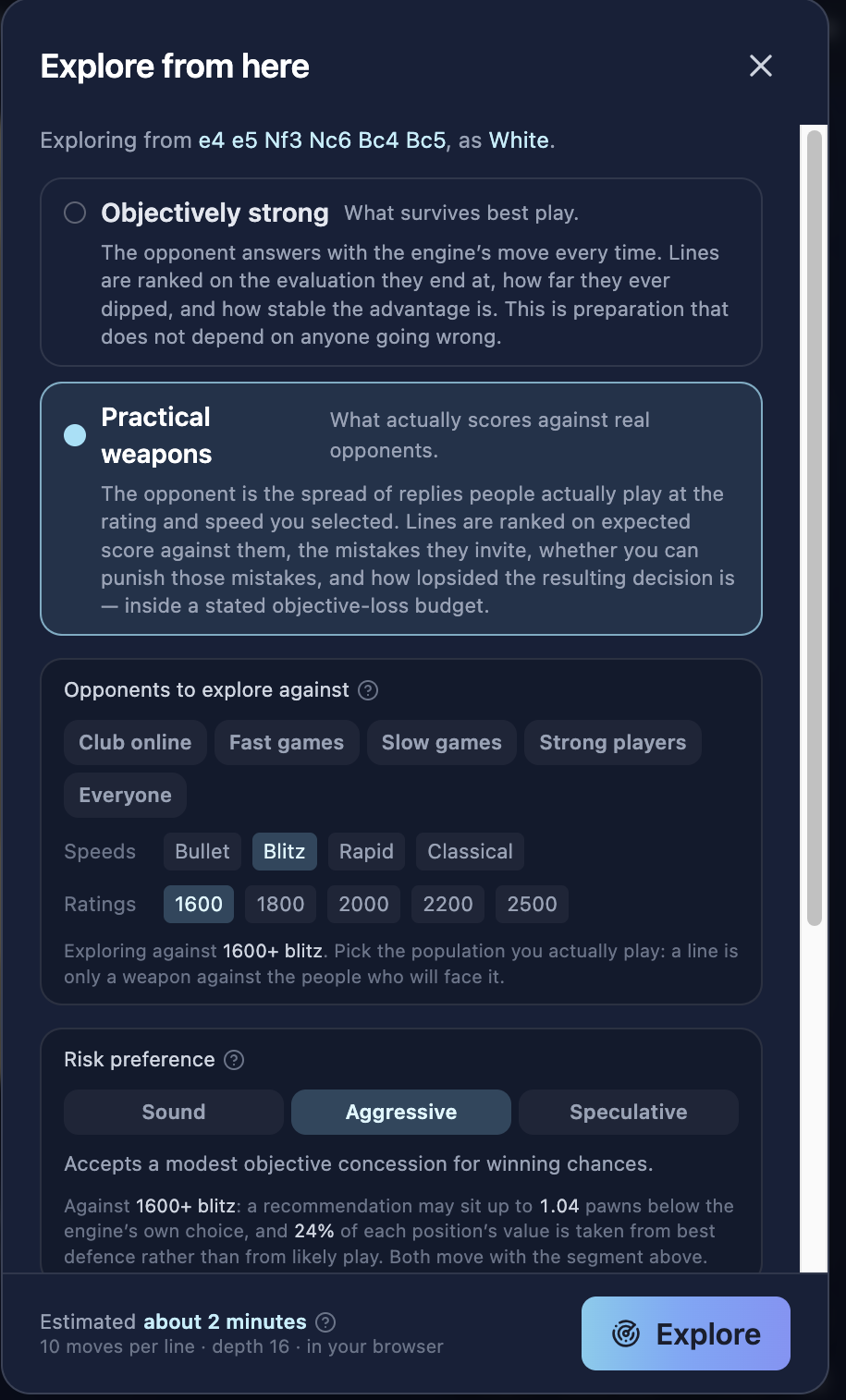
First, which kind of answer you want:
- Objectively strong — what survives best play. The opponent answers with the engine's move every time, and lines are ranked on the evaluation they end at, how far they ever dipped, and how stable the advantage is. This is preparation that doesn't depend on anyone going wrong.
- Practical weapons — what actually scores against real opponents. The opponent is the spread of replies people genuinely play at the rating and speed you selected, and lines are ranked on expected score against them, the mistakes they invite, whether you can punish those mistakes, and how lopsided the resulting decision is — inside a stated objective-loss budget.
Then, who you're preparing against: club online, fast games, slow games, strong players or everyone; bullet through classical; and a rating band from 1600 to 2500. A line is only a weapon against the people who will actually face it.
Finally, a risk preference — Sound, Aggressive or Speculative — and this is where it gets unusually explicit. Choose Aggressive against 1600+ blitz and the page tells you the terms in advance: a recommendation may sit up to 1.04 pawns below the engine's own choice, and 24% of each position's value is taken from best defense rather than from likely play. You're told what you're trading away before you trade it.
The search itself runs in your browser — ten moves per line at depth 16, with an up-front time estimate.
Step Four: Read the Answer Without Guessing at It
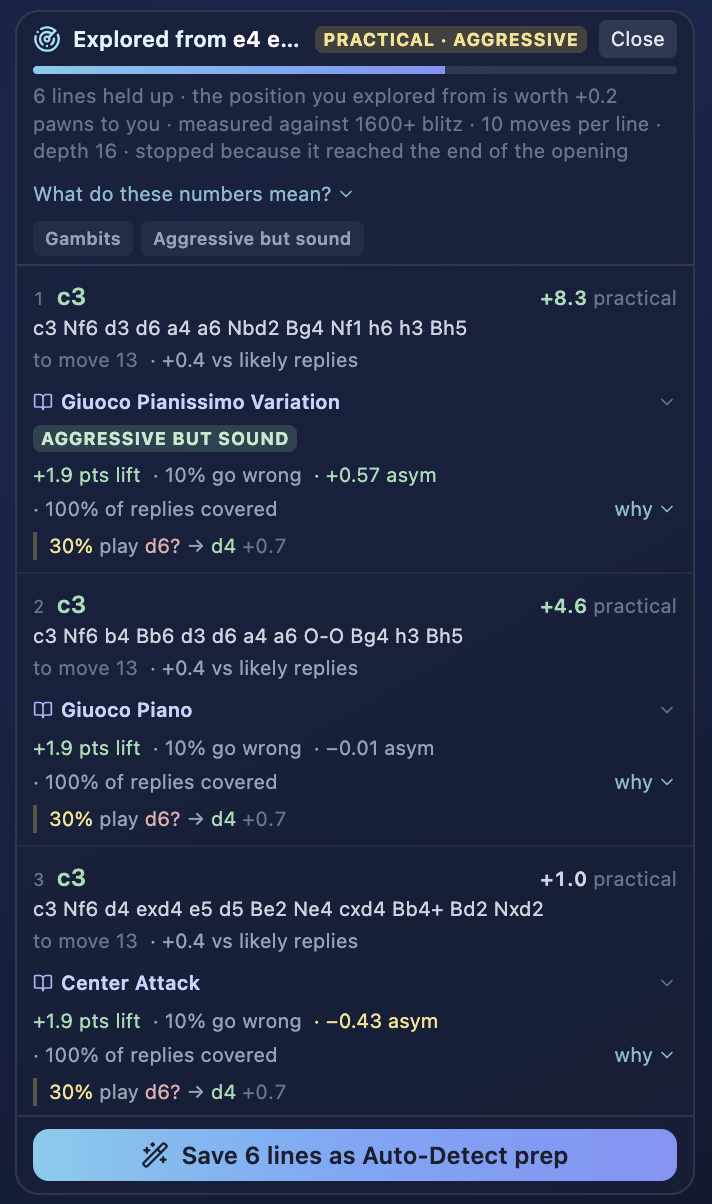
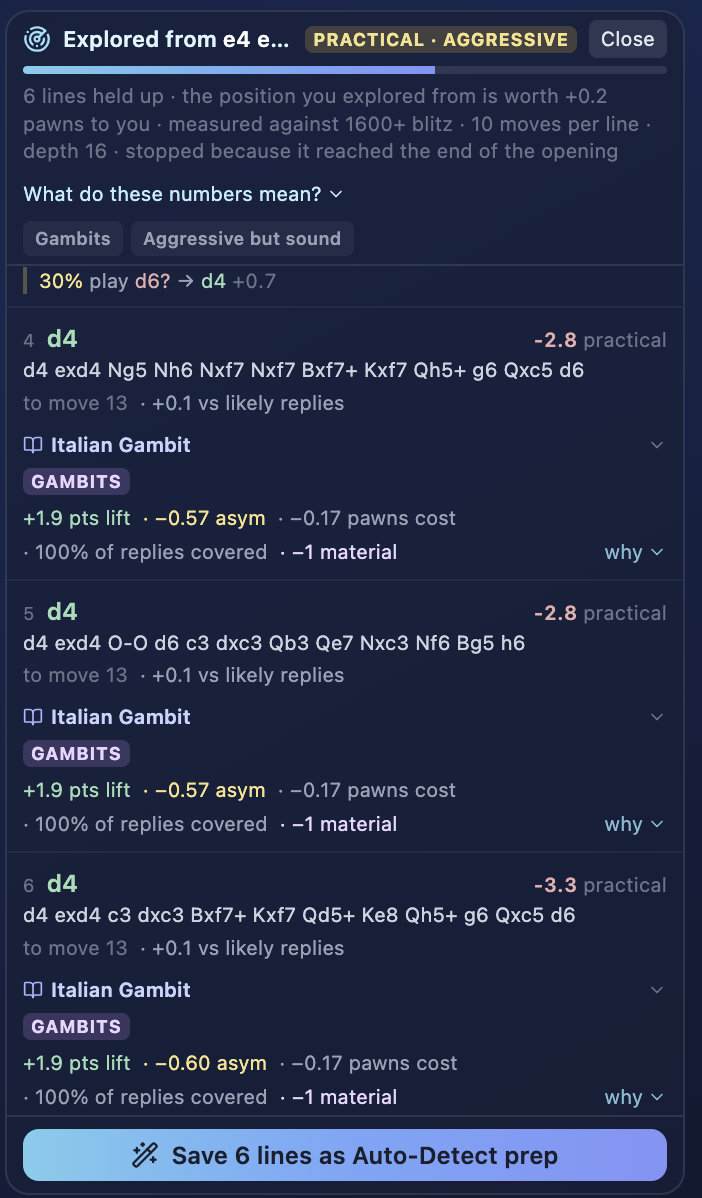
Every returned line carries the terms it was found under, and the header states what actually happened: 6 lines held up · the position you explored from is worth +0.2 pawns to you · measured against 1600+ blitz · 10 moves per line · depth 16 · stopped because it reached the end of the opening.
Each candidate then separates the things that should never be one number:
- The practical score — how it does against the replies people actually play at your level.
- Points lift — what it gains over the alternative.
- How often opponents go wrong — the mistake rate the line invites.
- Objective cost — what you're conceding to the engine to get all that.
- Coverage — what share of likely replies the preparation actually answers.
- Why it's here — an engine top choice, or a move that's simply common at this level. A move is never called "best" only because humans score well with it.
- The punishable mistake — "30% play d6? → d4 +0.7". At club level this is where most practical points come from: not the critical theoretical line, but the frequent inaccuracy and the concrete way to meet it.
Step Five: Keep It, Then Rehearse It
Exploration you don't save is exploration you'll repeat in three weeks. Decisions made in the Lab become a repertoire with practice attached.
The thing that's saved is not just the move order. It's the recall cue — the reason you chose the move, attached to the move itself. Three weeks later the move order is rarely the hard part; remembering why this was your answer is.
Practice then works like spaced repetition rather than a replay of everything: it surfaces the decisions that are actually due, and tracks first-attempt accuracy separately from eventual accuracy, since getting there on the third try is a different fact about your memory. Two modes:
- Repertoire — checks recall along the lines you saved.
- Sparring — plays on past the end of your preparation, which is where preparation usually fails in a real game.
Each branch can also be exported as PGN if you want it in a study elsewhere.
What It Costs, and What Needs an Account
Opening Lab is free, all of it. You can explore the board without logging in at all — including the comparison against other players and the engine evaluation. A free account is needed only for the parts that have to remember something: your own opening statistics, and the repertoire you save. That's a login, not a payment, and there's no card involved.
Connecting Chess.com or Lichess needs only a public username — never a password.
Frequently Asked Questions
What does "Your score: 26%" actually mean?
It's your score as a fraction of the points available from that position, counting a win as one and a draw as a half. It's always shown next to the number of games behind it, because 26% over four games and 26% over ninety games are very different claims.
Is a high human score the same as a good move?
No, and Opening Lab never merges the two. A human score measures practical difficulty for players in a rating band with a clock running. An engine evaluation measures soundness under deep search. Keeping them apart is the point — the cases where they disagree are the ones worth acting on.
Does it handle transpositions?
Yes. Preparation and your own record follow the position, not the sequence of moves, so reaching a position by a different move order finds the same work.
Why show Masters games if I'm rated 1400?
As a soundness check, not as a model to copy. A line that scores well in your band but disappears entirely at master level is usually one whose refutation is simply hard to find — useful to know before you commit a repertoire to it.
Do I have to give it my Chess.com or Lichess password?
No. Public usernames only. ChessLogix reads public game data.
Where do the population numbers come from?
The Lichess opening database, filtered to the rating range and time controls you select. Your personal statistics come only from the games you imported. Engine evaluations come from Stockfish and are kept separate from both.
Start with the opening you score worst in.
Open the board and explore it without logging in, or import your games and let Opening Lab rank your openings by result and follow the worst one down to the move where the trouble starts. Both are free.
Get Started Free