Decision Patterns: AI Coaching That Tells You Exactly Why You Lost
Engines tell you what went wrong. Decision Patterns tell you why — sixteen named habits, detected from the engine's own numbers, each with a fix small enough to use with a clock running.
Decision Patterns shipped in ChessLogix 1.0.59 and have been part of every release since, including the current 2.0.1. They are 16 named labels that classify the moments where your position changed meaningfully — not every move — into a concrete, improvable habit.
No more staring at an eval chart wondering what happened. Decision Patterns give you a vocabulary for your mistakes — and a roadmap to fix them.
What Are Decision Patterns?
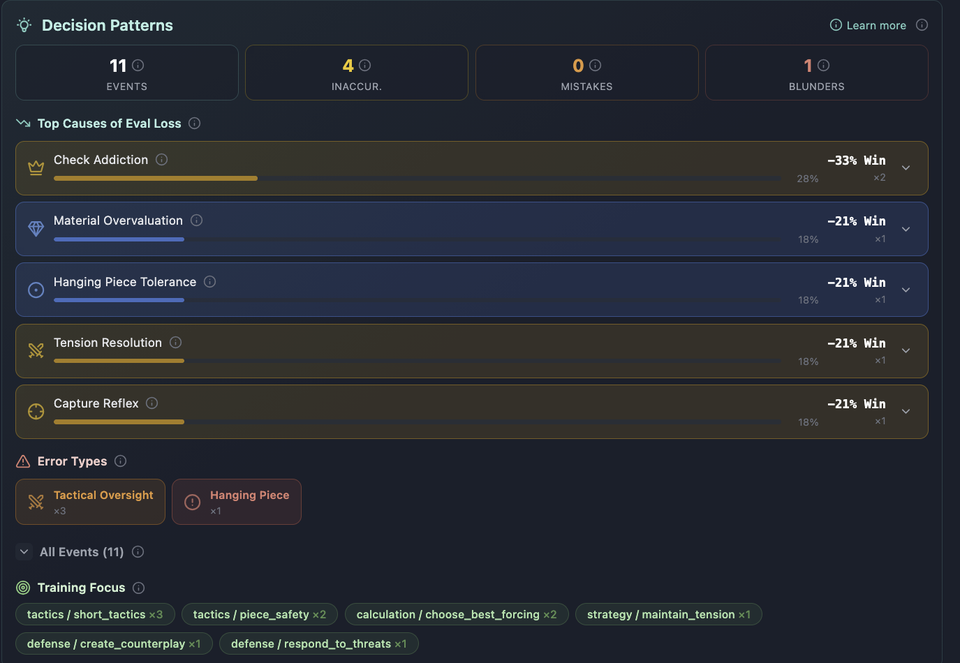
Every chess game has moments where the evaluation shifts. Traditional analysis just shows you the bar moving. Decision Patterns go one step further: sixteen detectors read the engine's evaluations together with what actually happened on the board — was there tension, was a piece hanging, was this a recapture, did the phase just change — and name the habit behind the swing.
Worth being precise about, because it decides what this costs: pattern detection is not a language model. It is deterministic code over Stockfish output and board features, which is why it runs on every game you analyze at no charge. The language model comes in later, when you ask for a move written out in English.
There are 16 patterns split into two tiers. The full reference, with the trigger and the fix for each one, lives in the Decision Patterns Guide.
10 Strategic Patterns
Strategic patterns are decision habits in how you handle strategy, pressure and tactics:
- Premature Simplification — You trade or simplify while ahead in a way that reduces your winning chances
- Tension Resolution Bias — You release central tension too early instead of improving a piece and keeping it
- Recapture Instinct — You recapture immediately when an in-between forcing move was stronger
- Check Addiction — You pick checks because they feel forcing, even when a quiet move is better
- Threat Underestimation — You play a normal-looking move and the opponent's reply lands a threat you never accounted for
- Advantage Anxiety — Clearly better, you switch to safe and passive moves and lose control
- Winning Passivity — Ahead, you stop improving, and the opponent activates
- Capture Reflex Under Pressure — Under pressure you capture to relieve tension without removing the actual threat
- Forced-Line Depth Limit — You see the first tactic but miss the deeper continuation or the best defense
- Defensive Resource Miss — In worse positions you miss the precise defensive move, sometimes an only-move
6 Advantage Patterns
Advantage patterns are about how you handle material, weaknesses, time and transitions:
- Material Overvaluation — You grab material when activity, king safety or coordination mattered more
- Pawn Weakness Creation — You push pawns in ways that leave permanent holes, backward or isolated pawns
- Hanging Piece Tolerance — You repeatedly leave pieces en prise or under-defended
- Time-Pressure Collapse — Your move quality drops sharply on panic-speed decisions
- Phase Conversion Drift — You lose the advantage around phase changes, keeping the old plan after big trades
- Counterplay Creation Failure — When worse, you play passively instead of creating threats or breaks
Each pattern carries four things: what it is, why it costs you, when to watch for it, and a one-line fix you can run in your very next game. "Winning Passivity", for instance, ends with: improve your worst piece, increase pressure, restrict counterplay — repeat until the position breaks. That is a rule small enough to use with a clock running.
How Decision Patterns Work with Move Analysis
ChessLogix doesn't just label patterns — it connects them to specific moments in your games through move-by-move analysis.
When you analyze a game, every move gets:
- Stockfish evaluation — Deep engine analysis at high depth for accuracy
- Written explanation — A plain-English description of why the move was good, bad, or interesting (AI membership)
- Decision Pattern classification — If the move created an eval swing, it's tagged with the relevant pattern
AI Move Explanation is where a language model does get involved. A reasoning model writes the commentary, and a separate fact-checking pipeline validates every claim against the Stockfish data before you see it — verifying tactics, cross-checking evaluations and flagging inconsistencies. The model supplies the language; the engine supplies the ground truth. That architecture is the whole reason the explanations can be trusted, and we wrote it up in What Is AI Chess Analysis?
The result: instead of seeing -2.3 on move 24, you see Winning Passivity — you were ahead, you stopped improving, and the opponent activated — with the fix attached to it.
Pattern detection and the eval chart are part of the free platform. The written, move-by-move explanation of why a move failed is AI Move Explanation, which is part of the optional AI membership.
The Evaluation Chart: Decision Patterns Visualized
The Evaluation Chart plots Decision Patterns directly on the eval graph. Every pattern trigger appears as an annotated marker, showing you:
- Where in the game the pattern fired (exact move number)
- What the pattern is (color-coded icon and label)
- How much eval was gained or lost at that point
- The coaching fix — hover or click to see the one-line improvement instruction
The biggest eval swing in every game gets a spotlight annotation — your "Fix This First" priority. Every pattern also carries a confidence reading, which says how strongly the evidence in this game supports the label. A pattern seen once at low confidence is a note; the same pattern at high confidence across five games is a training priority.
Meta-Coach: One Priority Across Many Games
Decision Patterns get more useful when you zoom out across multiple games with Meta-Coach, the multi-game coach. This one is a language model reading your history, and it is the second of the two membership features.
While single-game analysis tells you what happened in one game, Meta-Coach analyzes patterns across your entire recent history and produces a structured coaching report:
- Games Review — A bird's-eye summary of all analyzed games with performance mini-verdicts
- Highlight Reel — Your best moments, extracted automatically
- Learning Moments — Recurring mistakes with context on why they happen
- Playstyle Profile — Your signature style and emerging trends, identified by AI
- Evolution Roadmap — A personalized improvement plan with drills, missions, and progress signals
Meta-Coach uses the same Decision Patterns vocabulary to track which habits appear across games. If Winning Passivity shows up in four games out of five, it becomes your current priority, with the moves that prove it attached as evidence.
This isn't a one-off analysis. It is a loop: play games → analyze → get patterns → read the priority → train the positions you missed → repeat.
Move Analysis and Explanation: The Foundation
Everything above is built on the same foundation: move-by-move analysis.
When you upload a PGN or import from Lichess/Chess.com, ChessLogix runs every move through:
- Deep Stockfish analysis — Multi-PV engine lines at configurable depth
- AI explanation generation — Each critical move gets a human-readable explanation
- Pattern detection — Decision Patterns are identified and annotated
- Performance metrics — ACI, decision quality, pressure performance, resource management
The explanation for each move isn't a template — it is generated from that specific position, the surrounding game context, and the engine lines behind it. The same-looking mistake in two different positions gets two different explanations, because the reason it failed is different.
That is the difference from a bare engine line. The engine says "Nf3 was +1.2 better." ChessLogix names the habit behind it — Material Overvaluation: you took the pawn when activity and king safety mattered more — and hands you the rule that would have caught it: if taking a pawn opens lines or costs development, improve first, or calculate it very concretely.
Cross-Game Reports
Alongside Meta-Coach, ChessLogix includes 8 cross-game statistical reports that aggregate data from all your analyzed games:
- Advantage Conversion Index (ACI) — How well you convert winning positions
- Decision Quality — Your accuracy in critical moments
- Time Management & Pressure — Clock usage and performance under pressure
- Opening Scorecard — Win rates and accuracy by opening
- Castling & King Safety — How king safety affects your results
- Simplification & Trade Quality — Whether your exchanges help or hurt
- Sacrifice Effectiveness — Sound vs. unsound sacrifices
- Error Profile Analysis — Where and when you make mistakes
These reports are the statistical floor under everything else: patterns tell you what the habit is, and the reports tell you whether it is getting better.
How the Pieces Fit Together
Here's how all the pieces fit together:
- Upload or Import — PGN file, Lichess, or Chess.com
- Move analysis — Every move run through the engine, with written commentary available
- Decision Patterns — Eval swings classified into 16 named patterns with fixes
- Evaluation Chart — Patterns visualized on the eval graph
- Cross-Game Reports — Aggregate statistics across all games
- Meta-Coach — One priority read across your whole history
Each stage takes its input from the one before it, which is what stops these from being six unrelated tools: the patterns come from the move analysis, the reports count the patterns, and Meta-Coach reads across the reports.
What Ships With Decision Patterns
- 16 Decision Patterns — Named habits with a trigger, a reason and a one-line fix each
- Evaluation Chart annotations — Patterns plotted on the eval graph, with a "Fix This First" spotlight
- Pattern timeline — The sequence of patterns across a single game
- Confidence readings — How strongly this game's evidence supports each label
- Meta-Coach integration — The same vocabulary counted across your whole history
- Decision Patterns Guide — The full reference for all 16, at /decision-patterns-guide
- Reports Guide and Meta-Coach Guide — Documentation for the cross-game reports and the coach
What It Costs
Decision Pattern detection, the eval chart, the cross-game reports and every screen above are part of the free platform — no card, and no limit on how many games you analyze. Two features call a language model on every use and are an optional $14.99/month membership: AI Move Explanation, which writes out why a specific move failed, and Meta-Coach, which reads across your whole history and returns one priority.
Import from Chess.com, Lichess or a PGN file, and your patterns are named in a couple of minutes.
Your eval chart already has the story of your strengths and weaknesses. Decision Patterns give it a name — and a fix.
Analyze your games free.
Import from Chess.com, Lichess or a PGN file and see which Decision Patterns show up in your own games. Free, with no game limit.
Get Started Free